# Configuring Label Sets

A Label Set allows you to define alternative field labels within a single language. This ability helps Admins support Vault users within a country or region who may use regional variations, such as British English, or different teams and departments that may have their own terminology.


### Configuring Label Sets {#configuring-label-sets}


The following video demonstrates how to create label sets in Vault.
<video controls width=860 height =504 poster="https://platform.veevavault.help/assets/images/posters/2025-label-sets.png" preload="metadata">
    <source src="https://platform.veevavault.help/108e9b1d-559c-4d48-918b-1e4c5b5a533c/6d750fee-27c9-492d-9be5-e959474dd6eb/6d750fee-27c9-492d-9be5-e959474dd6eb_source__v.mp4" type="video/mp4" >
    
    <track
    label="English"
    kind="subtitles"
    srclang="en"
    src="/en/gr/assets/captions/25r3-label-sets.vtt"
    default />
    </video>

<a href="/en/gr/676776/">Details</a>


## How to Create a Label Set

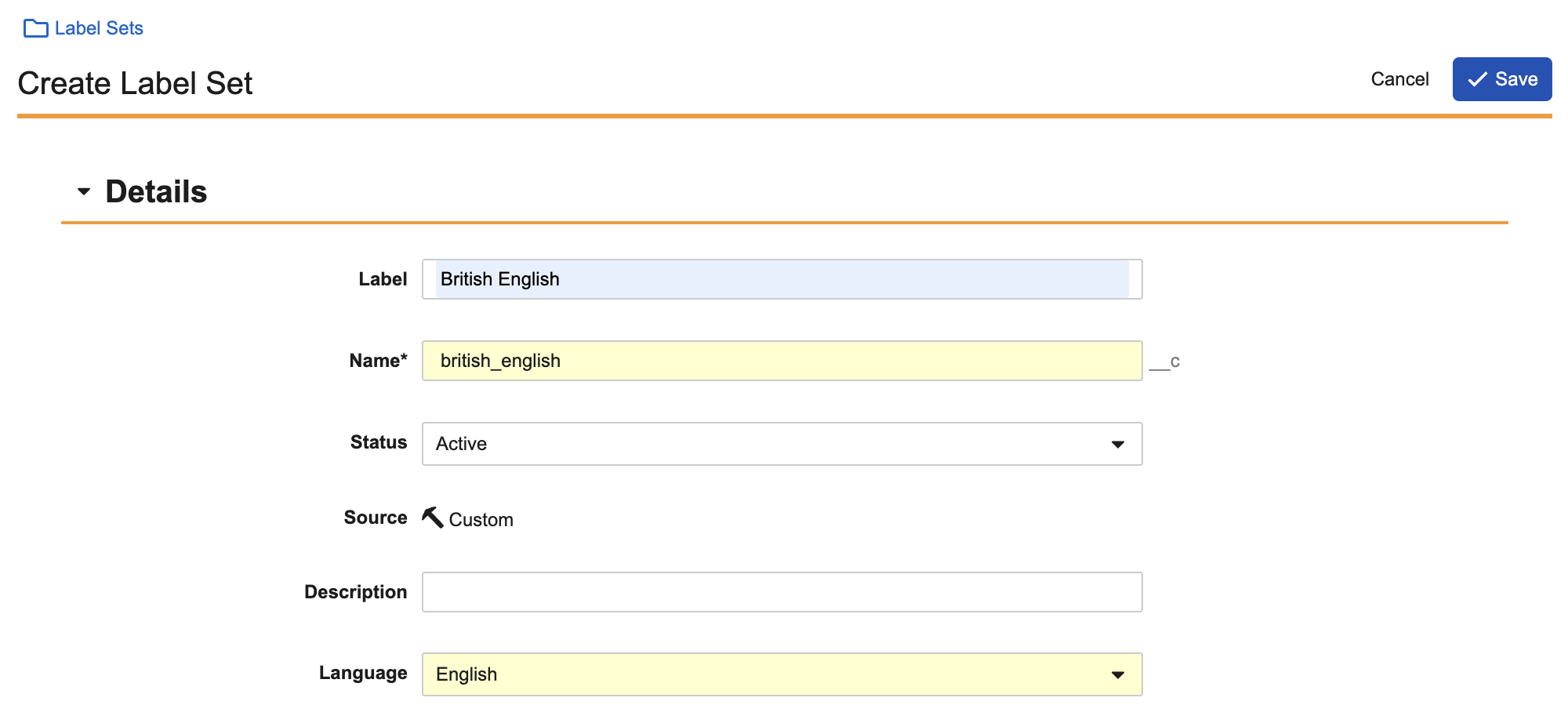
To create a Label Set:

1. Navigate to **Admin** > **Configuration** > **Label Sets**.
2. Click **Create**.
3. Enter a **Label**, such as British English or Medical English.
4. Optional: If needed, change the **Name**. The **Name** field autofills based on the **Label**, but is editable. This is the value the Vault API uses to reference the Label Set.
5. Optional: Select **Active** or **Inactive** as the **Status**. **Active** is selected by default.
6. Optional: Enter a **Description**.
7. Select the **Language** for the **Label Set**.
8. Click **Save**.

<a href="https://platform.veevavault.help/assets/images/configuring-label-set-25R23.png" data-lightbox="images" data-title="" data-alt="Configuring Label Sets">
  <img class="docimage" src="https://platform.veevavault.help/assets/images/configuring-label-set-25R23.png" alt="Configuring Label Sets" style="width: 400px;"  />
</a>

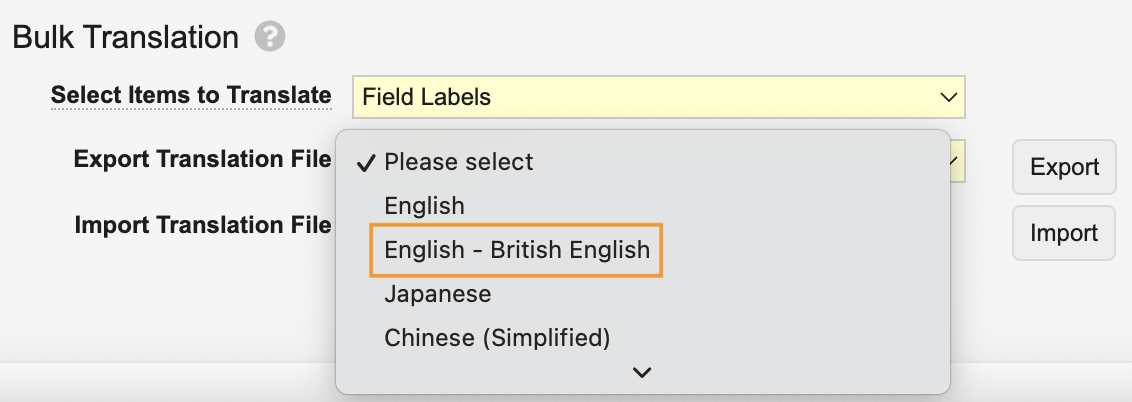
The Label Set is now created. You can create up to ten Label Sets per language. To define field labels that are translated by Label Sets, use the <a href="/en/gr/13309/#bulk-translation">Bulk Translation</a> tool in **Admin** > **Settings** > **Language & Region Settings**. When exporting field labels to translate, select the Label Set from the **Export Translation File** picklist. Inactive Label Sets are also included for selection.
<a href="https://platform.veevavault.help/assets/images/bulk-translation-label-set-25R23.png" data-lightbox="images" data-title="" data-alt="Bulk Translation Tool Label Set">
  <img class="docimage" src="https://platform.veevavault.help/assets/images/bulk-translation-label-set-25R23.png" alt="Bulk Translation Tool Label Set" style="width: 400px;"  />
</a>

To assign the Label Set to a user, select it from the **Label Set** picklist on their _User_ record. The user will see your Label Set translations on field labels when they access Vault. Only Label Sets associated with the user's selected _Language_ are available for selection. This field is not available unless added to the _User_ <a href="/en/gr/26387/#show-hide-move">record's layout</a>.

<div class="note-border alert-info">
  <div class="alert alert-info" role="alert">
    <div><i class="far fa-info-circle"></i></div>
    <div class="alert-text">
      <p><strong>Note</strong>: You can only export and import <em>Field Labels</em> for Label Sets.</p>
    </div>
  </div>
</div>


## Editing Label Sets

To edit a Label Set, select **Edit** from the Label Set's **Actions** menu. You can edit the Label Set's **Label**, **Name**, **Status**, and **Description**.

## Deleting Label Sets

To delete a Label Set, select **Delete** from the Label Set's **Actions** menu. You cannot delete a Label Set currently assigned to a user.

## Limits

* Each language allows up to ten Label Sets.
* Label Sets are not supported in Vault Mobile, Audit Trails, _Language_ picklists, Vault Loader, VQL, Notification Templates, System Messages, User Account Emails, or Configuration Migration packages.
* Picklist values, object types, lifecycle states, document types, and workflow tasks do not support Label Sets. If a user assigned a Label Set searches for one of these fields, the Language label is returned rather than the Label Set.
