Veeva provides various standard connections to support and automate business processes between separate Vaults. For example, organizations using both a Veeva QMS and a Veeva Safety Vault can use the Quality-Safety Connection for product quality complaint and adverse event intake. In many cases, a standard Veeva Connection provides a sufficient starting point for an organization’s data transfer needs, enabling quicker configuration and use.
Note: Veeva Connections are a complex feature set that can be used in many Vault applications, and this page is a high-level overview of their various capabilities. We strongly recommend working with your Veeva representative to gather and implement your organization’s specific requirements. Learn more about standard connections at the Veeva Connections Resource Hub, or in a specific connection’s Veeva Connect community.
Standard Connection Features & Benefits
Organizations with multiple Vaults on the same domain can consider a standard Veeva Connection to:
- Reduce workflow steps across organizations by sharing data and documents in real-time with the right teams.
- Increase data quality and traceability back to a Vault which provides the source of truth.
- Simplify an organization’s IT ecosystem by eliminating development and maintenance of custom integrations.
Each connection includes one or more Integrations, or features supporting a given business use case.
Connection Naming & Data Flow
Standard Veeva Connections transfer data between two Vaults within separate application suites, as indicated by the connection’s name. For example, the Quality-RIM Connection sends and receives data between Vaults within the Quality and RIM (Regulatory) application families. This naming convention does not indicate the direction in which data flows, nor does it indicate the required applications within those application suites.
This applies even when:
- A connection is implemented with only one integration, then additional integrations are added later.
- A connection (or a specific integration within that connection) supports only some applications within that family. For example, to use the Quality-RIM Connection’s Enhanced Change Control integration, the Quality Vault must have the QMS application enabled, and the RIM Vault must have Registrations. In contrast, this connection’s Product Transfer integration is supported in any Quality and RIM Vaults.
- A connection’s Integrations and related Integration Rules facilitate a one-way, unidirectional data transfer. All connections are considered to be two-way, or bidirectional, regardless of individual integration behavior.
Note: Your Vault’s Connection and related records in Admin > Connections may be labeled and/or named with “to”. This reflects a legacy naming convention and does not indicate directionality of data flow, nor does it strictly indicate the supported application. For example, the QMS-RIM Connection record is labeled and named QMS to RIM (qms_to_rim__v), but facilitates bidirectional data flow between RIM applications and Quality applications (QMS, QualityDocs).
Vault Domains
Standard Veeva Connections require that connected Vaults share the same domain. See additional details about Vault domains.
Transfer Timing & Errors
Standard Veeva Connections aim to facilitate data exchange in near real-time, ideally after approximately ten minutes. This timeframe spans the approximate five-minute intervals that each Vault takes to send and receive the data via their respective jobs. Once both jobs run successfully, users in the target Vault can work with new or updated documents and records.
Completion time can differ based on the volume and complexity of data being transferred. In the event the job times out or encounters errors, Vault Admins can review the details within related User Exception Messages.
Duplicate Detection
Standard Veeva Connections are designed to handle duplicate documents and records across Vaults. To do this, Vault populates them with a value that identifies it as a “connected” record in the source Vault, then checks for a matching value in the target Vault and stops or proceeds with the transfer accordingly. The specific fields Vault references during this process can vary across connections.
For example, the RIM-Clinical Operations Connection uses link__sys and global_id__sys fields to determine which documents and records to create or update in the target Vault when the data is updated in the source Vault:
- During creation, Vault populates the new target’s Link field with the source’s Global ID.
- During update, Vault references the existing target’s Link field to identify the source Global ID. When these values match, Vault proceeds with the update.
Duplicates occur when a connection cannot detect a matching value, for example when a user in the target Clinical Operations Vault manually creates a record: Since this record does not have the expected Link field value (with the source RIM Vault’s Global ID), the connection cannot recognize it as having a RIM counterpart when checking for duplicates. In this scenario, Vault would create a new record in Clinical Operations based on the source RIM record.
Document & Record Deletion
When documents or records are deleted from a source Vault, the connection does not delete the associated document or record in the target Vault. Generally, when this occurs Vault minimally clears the target record field it populated for the purposes of duplicate detection, for example the Link field that identifies the target Vault item as having a source counterpart.
Once a target item no longer has a source Vault counterpart, many connections leave the target record as it was when the connection stopped updating it, with the exception of any updates made directly in the target Vault. Consult your connection’s requirements for specific deletion event details.
Note: This behavior does not extend to a record’s Active or Inactive Status. Some connections deactivate target records upon source record deactivation, or clear target item fields that were mapped to a source item. Consult your connection’s requirements for specific deactivation event details.
Connection Stats
By default, connection records include a Connection Stats section that displays daily performance metrics for the connection, including the number of Spark messages sent or received and the number of failures, retries, timeouts, and fatal errors. See additional details about leveraging the Connection and Connection Stats objects in a connected Vault.
Some standard Veeva Connections include additional Veeva-provided stats which are specific to the connected Vault. For example, the RIM-Clinical Operations Connection tracks the number of CrossLink versions created in RIM per day via the Connection Stats object’s Crosslink Versions Created field.
When a Vault includes supplemental stats, they are located at Admin > Configuration > Objects > Connection Stats > Fields, and a Vault Admin can update the Connection Stats object page layout to include them. The Connection object page layout can also be updated to include the fields as default columns within the Connection Stats section.
Note: Depending on the connection, supplemental stats may only be provided within one connected Vault. For example, the RIM-Clinical Operations stat described above applies only to the RIM Vault. Application-specific stats will be added in future Vault releases.
Standard Integrations
Each Veeva Connection is supported by a set of individual integrations, or features which support a specific business use case.
While the functionality of an integration is unique to the connection, some common integrations include:
- Adverse Event Intake
- Document Exchange
- Product Data
- Product Quality Complaint Intake
- Study Data
A given connection’s integration functionality is determined by its Integration Points and supporting Integration Rules.
Connection & Integration Structure
Veeva Connections are represented in each connected Vault by several record types. These records can be found in Admin > Connections.
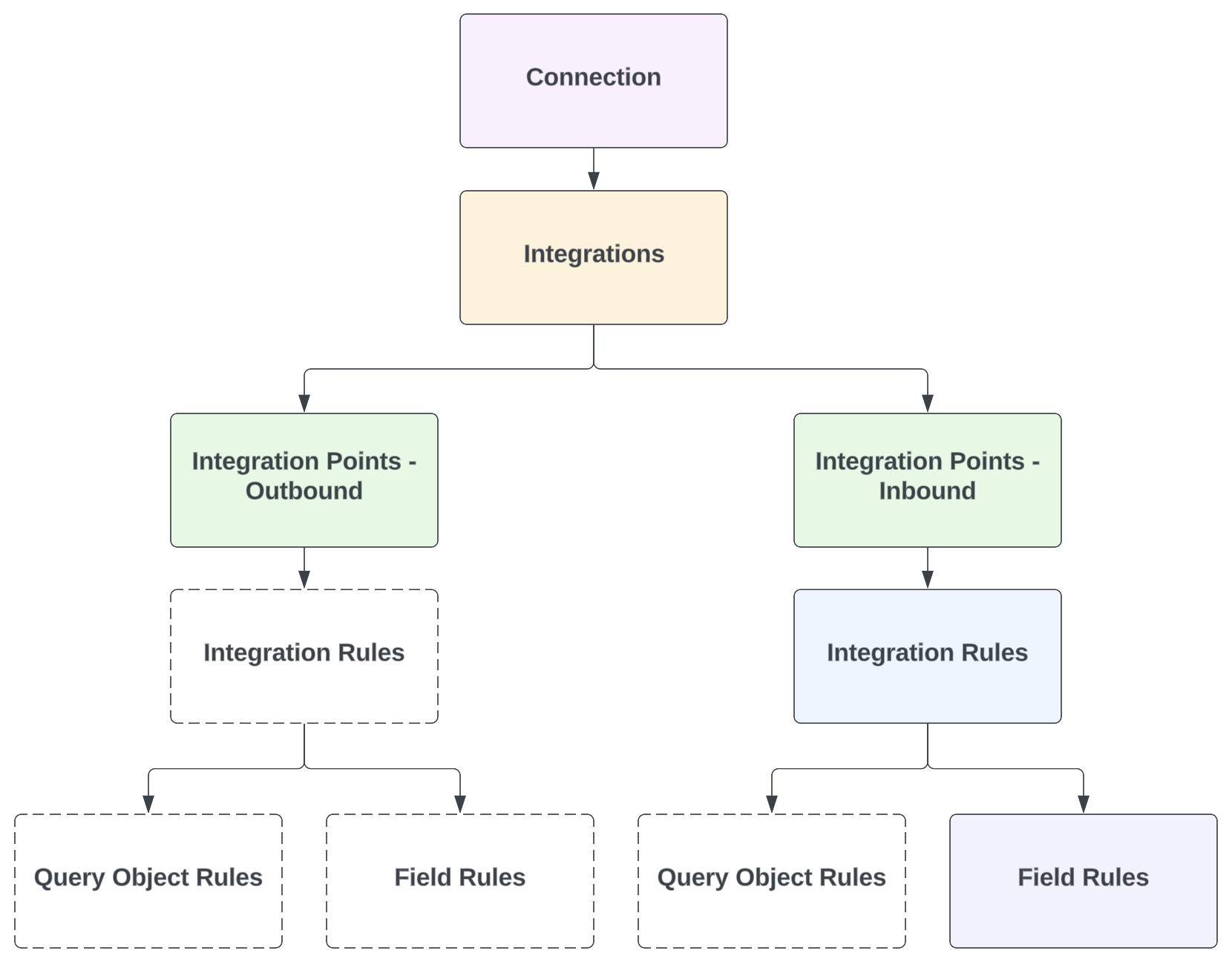
Each Vault includes one Connection record for the connection itself. Then, each integration (feature) is represented by an Integration record, which has one or more related Integration Points, Integration Rules, Query Object Rules, and/or Field Rules.
Depending on the integration, some standard (Veeva-provided) records may not be included. For example, in a Quality Vault, the Quality-RIM Connection’s Document Exchange integration currently includes only one Integration Point (inbound). Then, this single Integration Rule has Field Rules only. A high-level overview of these relationships is shown in the diagram below.
Integration Dependencies
Some connections require one integration to be implemented prior to or in parallel with another integration. For example, the Quality-RIM Connection’s Product Transfer integration must be in use along with the Enhanced Change Control integration. Similarly, the Enhanced Change Control integration supersedes the Variation Management integration, meaning organizations that have not yet implemented Variation Management should use Enhanced Change Control instead.
Additionally, a given integration may require that an application-specific feature is configured in that Vault. For example, the Enhanced Change Control integration described above additionally requires that the Quality Vault (QMS) is configured for Change Control.
Where required, a connection’s individual listing on this page notes any integration dependencies.
Clinical Operations Connections
Veeva EDC and Veeva eCOA are Clinical Data suite applications, and their connections with the Clinical Operations and Safety suites are described on this page.
For information about these applications and other Clinical Data connections not covered here, visit Veeva Clinical Data Help and the Veeva Connections Resource Hub.
Clinical Operations-EDC
The table below summarizes the integrations (features) supported for the Clinical Operations-EDC Connection.
| Integration | Required Applications |
|---|---|
| Enhanced Monitoring | CTMS, EDC |
| Final CRF | eTMF, EDC |
| Protocol Deviation Management | CTMS, EDC |
| Site Payments | Payments, EDC |
| Study Data Transfer | CTMS, EDC |
| Subject Tracking | CTMS, EDC |
See additional details about configuring this connection.
eCOA-Clinical Operations
The table below summarizes the integrations (features) supported for the eCOA-Clinical Operations Connection.
| Integration | Required Applications |
|---|---|
| Study Data Transfer | Any Clinical Operations app, eCOA |
| End of Study Media | eTMF, eCOA |
See additional details about configuring this connection.
Quality-Clinical Operations
The table below summarizes the integrations (features) supported for the Quality-Clinical Operations Connection.
| Integration | Required Applications |
|---|---|
| Issue Management | QMS with Deviations configured, CTMS |
| Study Data Transfer | Any |
See additional details about configuring this connection.
RIM-Clinical Operations
The table below summarizes the integrations (features) supported for the RIM-Clinical Operations Connection.
| Integration | Purpose | Required Applications | Dependencies |
|---|---|---|---|
| Document Exchange | Two-way transfer of steady-state CrossLink documents across Vaults. | eTMF, Submissions | By default, when a Clinical Operations CrossLink’s Product field is blank, the connection populates the target RIM CrossLink’s products based on the Product Family Clinical Study for every study referenced by the source (Clinical Operations) document. Contact Veeva Support to instead default the RIM value according to the Primary Product Family assigned to the source document’s Study. |
| Product Data Transfer | Transfer and align product data to facilitate common terminology across Vaults. | Any | None |
| Study Data Transfer | Transfer and align study data to facilitate common terminology across Vaults. | Any | None |
| Submission Tracking | Transfer relevant regulatory tracking information for initial clinical trial approvals from RIM to Clinical Operations Milestones. | Study Startup, Submissions | RIM’s Submission Wizard feature must be enabled to support EU CTR. |
See additional details about configuring this connection.
Safety-Clinical Operations
The table below summarizes the integrations (features) supported for the Safety-Clinical Operations Connection.
| Integration | Required Applications |
|---|---|
| Safety Letters | Safety, eTMF for Document Exchange. Site Connect is required to send a Safety Distribution to sites. |
| Study Data Transfer | Any |
See additional details about configuring this connection.
Study Training-Clinical Operations
The Study Training-Clinical Operations Connection forms the basis of the Study Training application. As such, the table below lists the individual integrations (features) which support the Study Training application overall.
| Integration | Required Applications |
|---|---|
| Study Data Transfer | N/A |
| Study Persons Transfer | N/A |
| Document Exchange | N/A |
| User Transfer | N/A |
See additional details about setting up Study Training.
Regulatory (RIM) Connections
RIM-Clinical Operations
The table below summarizes the integrations (features) supported for the RIM-Clinical Operations Connection.
| Integration | Purpose | Required Applications | Dependencies |
|---|---|---|---|
| Document Exchange | Two-way transfer of steady-state CrossLink documents across Vaults. | eTMF, Submissions | By default, when a Clinical Operations CrossLink’s Product field is blank, the connection populates the target RIM CrossLink’s products based on the Product Family Clinical Study for every study referenced by the source (Clinical Operations) document. Contact Veeva Support to instead default the RIM value according to the Primary Product Family assigned to the source document’s Study. |
| Product Data Transfer | Transfer and align product data to facilitate common terminology across Vaults. | Any | None |
| Study Data Transfer | Transfer and align study data to facilitate common terminology across Vaults. | Any | None |
| Submission Tracking | Transfer relevant regulatory tracking information for initial clinical trial approvals from RIM to Clinical Operations Milestones. | Study Startup, Submissions | RIM’s Submission Wizard feature must be enabled to support EU CTR. |
See additional details about configuring this connection.
RIM-PromoMats
The table below summarizes the integrations (features) supported for the RIM-PromoMats Connection.
| Integration | Required Applications |
|---|---|
| AdPromo Submission Management | Submissions, PromoMats |
| Document Exchange | Submissions, PromoMats |
| Product Data Transfer | Any |
See additional details about configuring this connection.
RIM-Medical
The RIM-Medical Connection supports the below integrations (features).
See additional details about configuring this connection.
| Integration | Purpose | Required Applications | Dependencies |
|---|---|---|---|
| Document Exchange | One-way transfer of steady-state CrossLink documents from RIM to Medical. | Submissions, MedComms | None |
| Product Data Transfer | Transfer and align product data to facilitate common terminology across Vaults. | Any, but with limitations when Registrations is not in use. | None |
Quality-RIM
The table below summarizes the integrations (features) supported for the Quality-RIM Connection.
| Integration | Required Applications | Dependencies |
|---|---|---|
| Document Exchange | QualityDocs, Submissions | None |
| Enhanced Change Control | QMS with Change Control, Registrations | - Requires Product Transfer - Supersedes Variation Management |
| Product Transfer | Any | Required for Enhanced Change Control |
| Variation Management | QMS with Change Control, Registrations | Superseded by Enhanced Change Control |
See additional details about configuring this connection.
Safety-RIM
The Safety-RIM Connection supports Product Data Transfer between any Safety and RIM Vault.
See additional details about configuring this connection.
Safety Connections
Veeva EDC and Veeva eCOA are Clinical Data suite applications, and their connections with the Clinical Operations and Safety suites are described on this page.
For information about these applications and other Clinical Data connections not covered here, visit Veeva Clinical Data Help and the Veeva Connections Resource Hub.
Safety-Clinical Operations
The table below summarizes the integrations (features) supported for the Safety-Clinical Operations Connection.
| Integration | Required Applications |
|---|---|
| Safety Letters | Safety, eTMF for Document Exchange. Site Connect is required to send a Safety Distribution to sites. |
| Study Data Transfer | Any |
See additional details about configuring this connection.
Safety-EDC
The Safety-EDC Connection supports Adverse Event Intake between any Safety and EDC Vault.
See additional details about configuring this connection.
Safety-RIM
The Safety-RIM Connection supports Product Data Transfer between any Safety and RIM Vault.
See additional details about configuring this connection.
Medical-Safety
The Medical-Safety Connection supports Adverse Event Intake between any Safety and Medical Inquiry Vault.
See additional details about configuring this connection.
Quality-Safety
The table below summarizes the integrations (features) supported for the Quality-Safety Connection.
| Integration | Required Applications |
|---|---|
| Adverse Event Intake | Safety, QMS with Complaints |
| Product Quality Complaint Intake | Safety, QMS with Complaints |
See additional details about configuring this connection.
Quality Connections
Medical-Quality
The Medical-Quality Connection supports Product Quality Complaint Intake between any Medical Inquiry Vault and a Quality Vault.
See additional details about configuring this connection.
Quality-Clinical Operations
The table below summarizes the integrations (features) supported for the Quality-Clinical Operations Connection.
| Integration | Required Applications |
|---|---|
| Issue Management | QMS with Deviations configured, CTMS |
| Study Data Transfer | Any |
See additional details about configuring this connection.
Quality-LIMS
The Quality-LIMS Connection forms the basis of the LIMS application. As such, the table below lists the individual integrations (features) which support the LIMS application overall.
| Integration | Required Applications |
|---|---|
| Lab Investigation Transfer | N/A |
| Reference Object Transfer | N/A |
| Document Exchange | N/A |
See additional details about configuring this connection.
Quality-RIM
The table below summarizes the integrations (features) supported for the Quality-RIM Connection.
| Integration | Required Applications | Dependencies |
|---|---|---|
| Document Exchange | QualityDocs, Submissions | None |
| Enhanced Change Control | QMS with Change Control, Registrations | - Requires Product Transfer - Supersedes Variation Management |
| Product Transfer | Any | Required for Enhanced Change Control |
| Variation Management | QMS with Change Control, Registrations | Superseded by Enhanced Change Control |
See additional details about configuring this connection.
Quality-Safety
The table below summarizes the integrations (features) supported for the Quality-Safety Connection.
| Integration | Required Applications |
|---|---|
| Adverse Event Intake | Safety, QMS with Complaints |
| Product Quality Complaint Intake | Safety, QMS with Complaints |
See additional details about configuring this connection.
Study Training-Clinical Operations
The Study Training-Clinical Operations Connection forms the basis of the Study Training application. As such, the table below lists the individual integrations (features) which support the Study Training application overall.
| Integration | Required Applications |
|---|---|
| Study Data Transfer | N/A |
| Study Persons Transfer | N/A |
| Document Exchange | N/A |
| User Transfer | N/A |
See additional details about setting up Study Training.
Medical Connections
Medical-Safety
The Medical-Safety Connection supports Adverse Event Intake between any Safety and Medical Inquiry Vault.
See additional details about configuring this connection.
RIM-Medical
The RIM-Medical Connection supports the below integrations (features).
See additional details about configuring this connection.
| Integration | Purpose | Required Applications | Dependencies |
|---|---|---|---|
| Document Exchange | One-way transfer of steady-state CrossLink documents from RIM to Medical. | Submissions, MedComms | None |
| Product Data Transfer | Transfer and align product data to facilitate common terminology across Vaults. | Any, but with limitations when Registrations is not in use. | None |
Medical-CRM
The Medical-CRM Connection supports Case Intake between a Medical Inquiry Vault and Vault CRM.
See additional details about configuring this connection.
Medical-Network
The Medical-Network Connection allows Medical Inquiry users to search Network for healthcare professional contact details while creating a Case Contact.
See additional details about configuring this connection.
Medical-Quality
The Medical-Quality Connection supports Product Quality Complaint Intake between any Medical Inquiry Vault and a Quality Vault.
See additional details about configuring this connection.
Commercial Connections
PromoMats-CRM
The PromoMats-CRM Connection supports data transfer between a PromoMats Vault and Vault CRM.
See additional details about configuring this connection.
PromoMats-Medical
The PromoMats-Medical Connection supports Document Exchange between a Medical Inquiry Vault and a PromoMats Vault.
See additional details about configuring this connection.
RIM-PromoMats
The table below summarizes the integrations (features) supported for the RIM-PromoMats Connection.
| Integration | Required Applications |
|---|---|
| AdPromo Submission Management | Submissions, PromoMats |
| Document Exchange | Submissions, PromoMats |
| Product Data Transfer | Any |
See additional details about configuring this connection.
Medical-Network
The Medical-Network Connection allows Medical Inquiry users to search Network for healthcare professional contact details while creating a Case Contact.
See additional details about configuring this connection.